How-to
Save and replay a filter
A saved filter keeps the criteria and sort of an advanced search under a name. One click replays it on the current tickets. You can rename or delete it.
Save the search
Link to the “Save the search” section- In advanced search, set your criteria and your sort.
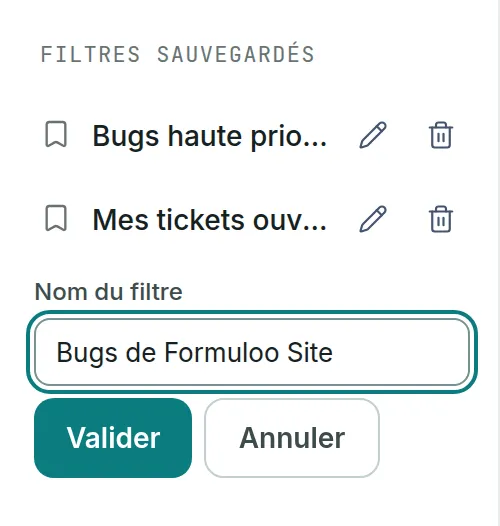
- In the Saved filters column, to the left of the criteria, click Save this filter.
- In Filter name, type a name, for example “High priority bugs”.
- Click Save. The filter joins the list, which is sorted alphabetically.
Replay a filter
Link to the “Replay a filter” section- Open advanced search from the Filters tab in the top bar.
- In Saved filters, click the filter’s name. Its criteria and sort come back into the form, and the results update.
The filter being played is highlighted in the list. It stays highlighted as long as the criteria shown are exactly its own. The page address also carries the criteria, so you can copy it to share the search with someone who does not have this filter.
Rename or delete a filter
Link to the “Rename or delete a filter” section- On the filter’s line, click the pencil, whose tooltip says Rename.
- In Filter name, correct the name.
- Click Save. The criteria do not change.
- To delete a filter, click the bin on its line, whose tooltip says Delete.
- Read the question “Delete “High priority bugs”? This cannot be undone.”
- Click Delete. Cancel closes the question without deleting anything.
A filter cannot be edited. To change its criteria, replay it, adjust the search, save it under a new name, then delete the old filter.
If you get stuck
Link to the “If you get stuck” section| What you see | What to do |
|---|---|
| The Save this filter button does not appear. | No criterion is set. Set at least one. The sort alone does not count. |
| “Give the filter a name: at least one character, 100 at most.” | Type a name that is not made only of spaces, in 100 characters at most. |
| “Vous avez déjà un filtre nommé « … »” (You already have a filter with this name) | Choose another name, or delete the old filter first. This message comes from the server and is shown in French. |
| “Vous avez atteint 50 filtres sauvegardés. Supprimez-en un pour en enregistrer un autre.” (You have reached 50 saved filters. Delete one to save another.) | Delete a filter you no longer use. |
| “This filter carries 1 criterion/criteria this screen cannot replay. The list beside is therefore wider than its name promises.” | The filter was saved with a criterion the screen does not offer. Set up the search you want again, then save it under a new name. |
| “Your saved filters could not be loaded.” | Click Retry under the message. |
Good to know
Link to the “Good to know” section- A replayed filter searches the projects you are a member of at the time you replay it. A filter that names a project you have left no longer finds anything in that project.
- On a screen less than 1064 pixels wide, the column folds above the form. Its title, Saved filters followed by the number of filters in brackets, opens it again.
Loading search…