Reference
Ticket types
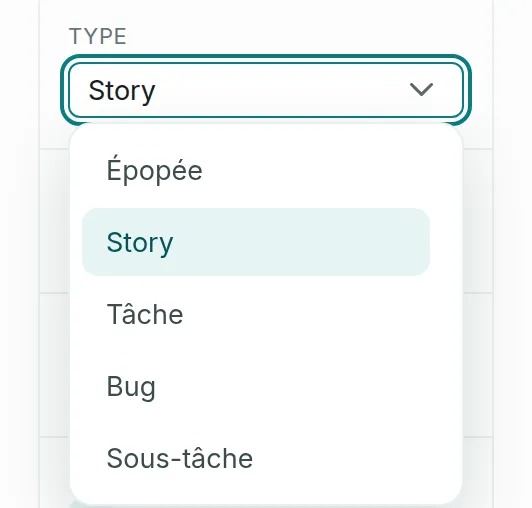
A ticket has one of five types: Epic, Story, Task, Bug or Subtask. The type decides which ticket it sits under, what it can hold and whether it goes into a sprint.
The five types
Link to the “The five types” sectionYou choose the type at creation, in Type, then read and change it in the ticket panel. Its icon shows it on board cards and in links.
| Type | Icon | Its parent | What it can hold | Sprint | Points |
|---|---|---|---|---|---|
| Epic | Purple square, white lightning bolt | None, ever | Stories, tasks and bugs | No | Yes |
| Story | Green square, white bookmark | An epic, optional | Sub-tasks | Yes | Yes |
| Task | Blue square, white tick | An epic, optional | Sub-tasks | Yes | Yes |
| Bug | Red circle, white dash | An epic, optional | Sub-tasks | Yes | Yes |
| Subtask | Blue square, white tick, like the task | A story, a task or a bug, required | Nothing | Follows its parent | No |
Story, Task and Bug follow exactly the same rules. Only their name and icon set them apart.
The hierarchy
Link to the “The hierarchy” section- It has three levels at most: an epic, its stories, tasks and bugs, then their sub-tasks.
- A ticket never skips a level. A sub-task does not sit directly under an epic.
- A parent and its children are always in the same project.
- You choose the parent at creation, or later in the Parent field of the panel. The list only offers the project’s tickets that suit the type.
- A ticket can become neither its own parent nor the child of one of its descendants.
- A project’s Epics screen gives each epic’s progress: tickets done out of the total, and points done out of the total.
The sprint and points
Link to the “The sprint and points” section- Only stories, tasks and bugs go into a sprint. An epic never does.
- A sub-task follows its parent’s sprint. When you put the parent into a sprint, or take it out, its sub-tasks follow it. A sub-task does not go into a sprint on its own.
- A sub-task carries no estimate in points. The other types can carry one: 1, 2, 3, 5, 8 or 13 points.
Change a ticket’s type
Link to the “Change a ticket’s type” sectionIn the ticket panel, the Type field offers the five types. The change is accepted only if the ticket meets the rules of the new type:
- Between Story, Task and Bug, the change always goes through.
- To Epic: the ticket has no parent, is in no sprint and holds no sub-task.
- From Epic to Story, Task or Bug: the epic no longer holds any ticket.
- A sub-task keeps its type, and no other ticket becomes a sub-task. To break work down, create a new sub-task from its parent.
If you get stuck
Link to the “If you get stuck” section| What you see | What to do |
|---|---|
| “Your change was not saved. The input was refused: check the fields.” | The new Type or the new Parent breaks one of the rules above. First detach what is in the way: the parent, the sprint or the children. |
| “A summary is required and must not exceed 255 characters.” | At creation, this message also covers a refused type: a Subtask with no parent, or an Epic with a Parent epic. Create the sub-task from its parent, and leave No epic for an epic. |
| “RG-024 : un Epic n’est pas sprintable” (an epic cannot go into a sprint) | You dragged an epic towards a sprint. Place its stories, tasks and bugs instead. |
| “RG-024 : une sous-tâche suit le sprint de son parent, elle ne se rattache pas seule” (a sub-task follows its parent’s sprint and cannot be added on its own) | You dragged a sub-task towards a sprint. Place its parent instead: the sub-task will follow it. |
These last two reasons come from the server and stay in French. They appear under the title “1 ticket(s) were not attached to the sprint”, which counts the refused tickets.
Loading search…