How-to
Map the import columns
In the second step of the Jira import, each ticket field receives a column of your file. The usual Jira columns are recognised on their own, and you correct the rest before the preview.
Review the proposed mapping
Link to the “Review the proposed mapping” section- Read the Map the columns table. Each line gives a Formuloo field, the Jira CSV column chosen for it, and a Preview, which is the value of that column on the first row of the file.
- Check that Summary, the only required field, has a column. It is marked with an asterisk.
- Check the fields left on Ignore this column. They will stay empty in the imported tickets.
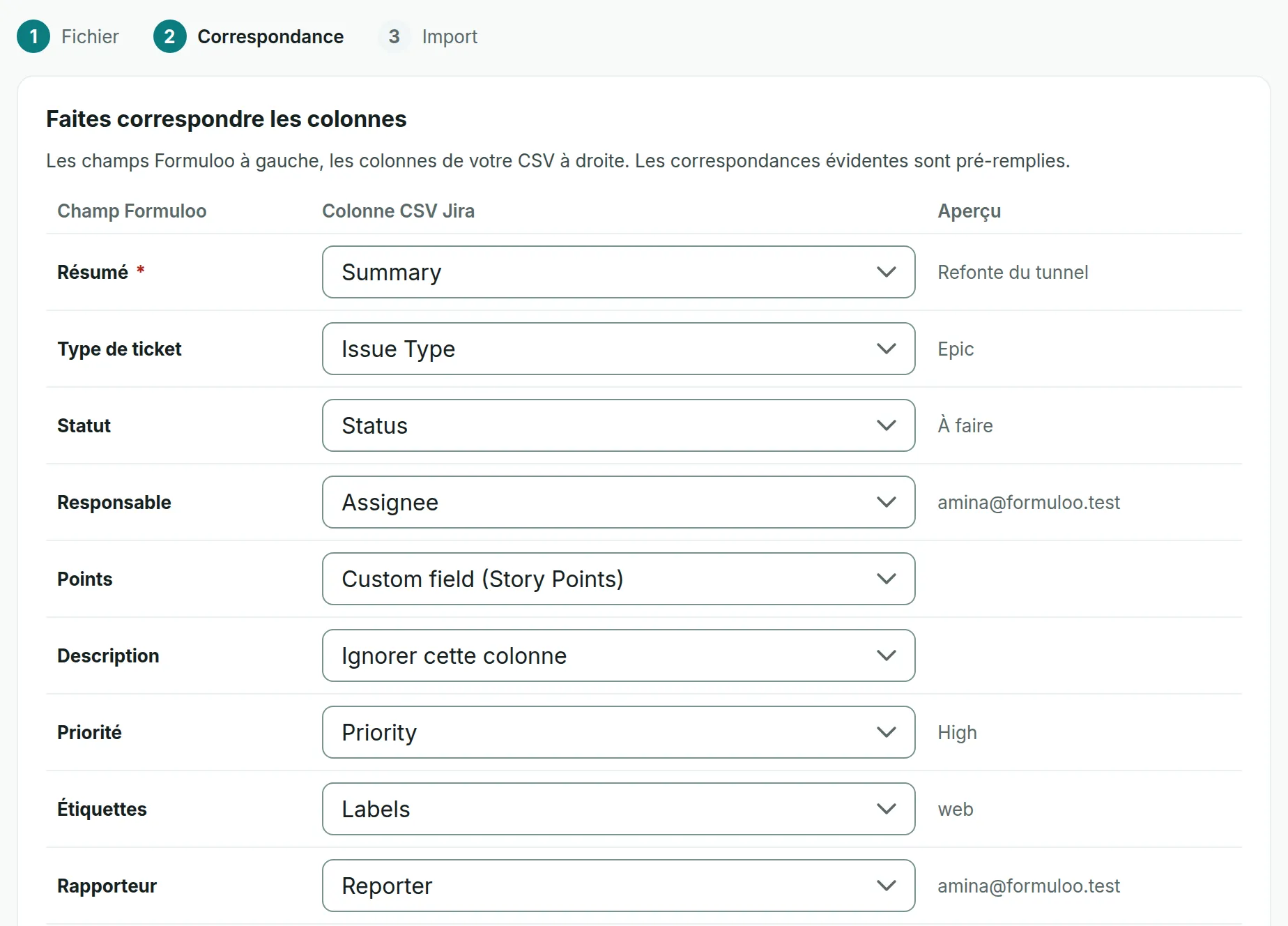
A column is recognised when its header is one of those in the table below. Capitals and accents do not matter.
| Formuloo field | Headers recognised |
|---|---|
| Summary | Summary, Résumé |
| Issue type | Issue Type, Type, Type de ticket |
| Status | Status, Statut, État |
| Assignee | Assignee, Assigné |
| Points | Story Points, Story point estimate, Custom field (Story Points), Custom field (Story point estimate), Estimation |
| Description | Description |
| Priority | Priority, Priorité |
| Labels | Labels, Étiquettes, Libellés |
| Reporter | Reporter, Rapporteur |
| Due date | Due Date, Échéance |
| Epic | Epic Link, Custom field (Epic Link), Lien Epic, Epic |
| Parent | Parent, Parent id, Parent key |
| Jira key | Issue key, Key, Clé, Clé du ticket |
Change a mapping
Link to the “Change a mapping” section- On the field’s line, open the list in the Jira CSV column column.
- Choose the column of your file. To leave the field empty, choose Ignore this column.
- Read the line’s Preview to check that the value fits the field.
- When everything is right, click Continue to the preview.
A column serves only one field. Choosing it for a field removes it from the field that had it.
Prepare the values in the file
Link to the “Prepare the values in the file” sectionEach value in the file must also be understood by the import. Correct the file or the project before you run it.
| Field | What is accepted |
|---|---|
| Summary | A text of 255 characters at most. |
| Issue type | Epic, Story, Task, Bug, Sub-task, or their French names: Épopée, Épique, Histoire, Récit, Tâche, Anomalie, Sous-tâche. When empty, the ticket becomes a Story. |
| Status | The exact name of a status in the project’s workflow, regardless of capitals and accents. The default statuses are named À faire, En cours, En revue and Terminé for the import, even though the English interface shows To do, In progress, In review and Done. When empty, the ticket takes the first status of the To do category. |
| Assignee | The email address of a member of the project. |
| Reporter | The email address of a member of the project. When empty, you become the reporter. |
| Points | A number, zero or more. Decimals are dropped. |
| Description | Text, or Markdown. HTML and images are not accepted. |
| Priority | Highest, High, Medium, Low, Lowest, or Très haute, Haute, Moyenne, Basse, Très basse. When empty, the priority is Medium. |
| Labels | One or more Labels columns, merged. Each label is 50 characters at most. |
| Due date | A date in YYYY-MM-DD format, or in Jira’s format, such as 24/Sep/26. |
| Epic and Parent | The Jira key of a ticket in the file, the key of a ticket already in the project, or the Jira identifier of the parent when the file has an Issue id column and Jira key has a column. |
| Jira key | The ticket’s key in Jira, such as JIRA-7. It is used for attaching tickets to their parent and for running an import again. |
If you get stuck
Link to the “If you get stuck” sectionA refused row is shown as “Row 12, column “statut”: …”. The column cited is the internal name of the field: resume, type, statut, assigne, rapporteur, description, priorite, etiquettes, estimation, echeance, epic or parent. The messages that follow come from the server and are in French.
| What you see | What to do |
|---|---|
| “Statut non reconnu : « In Progress »” (Status not recognised) | Add a status with this name to the project’s workflow, or rename the status in the file, for example to “En cours”. |
| “Utilisateur inconnu : serge@exemple.com” (Unknown user) | Add the person to the project with this address, or replace the value with a member’s address. A display name is not enough. The email address is required. |
| “Type non mappé : « Initiative »” (Type not mapped) | Replace the type in the file with one of the accepted types. |
| “Priorité non reconnue : « BLOCKER »” (Priority not recognised) | Replace the priority with one of the five accepted priorities, or empty the cell. |
| “Résumé absent (EF-3.1)” (Summary missing) | Fill in the row’s summary, or check the column chosen for Summary. |
| “Résumé de plus de 255 caractères (EF-3.1)” (Summary longer than 255 characters) | Shorten the summary. |
| “Nombre attendu, lu « … »” (Number expected) or “Nombre négatif : « … » (RG-025)” (Negative number) | Put a number, zero or more, in the points column. |
| “Date attendue au format AAAA-MM-JJ, lu « … »” (Date expected in YYYY-MM-DD format) | Write the due date in YYYY-MM-DD format. |
| “Étiquette de plus de 50 caractères (RG-022) : « … »” (Label longer than 50 characters) | Shorten the label. |
| “Épopée parente introuvable : JIRA-7” (Parent epic not found) | Add the row of JIRA-7 to the file, or import it first. Also check that Jira key has a column. |
| “une sous-tâche doit avoir un parent (EF-3.4)” (a subtask must have a parent) | Give the subtask a parent, in the column chosen for Parent. |
| “un Epic ne peut pas avoir de parent (EF-3.4)” (an epic cannot have a parent) | Empty the columns chosen for Epic and Parent on the epic’s row. |
| A message that starts with “un ticket « Story » se rattache à : …” (a Story ticket can be attached to…) | The parent is not of the right type. Attach the ticket to a parent of an accepted type. |
| A message that contains “est du HTML, et le texte se rédige en Markdown” (is HTML, and the text is written in Markdown) | Remove the HTML tags from the description. |
| “une image ne s’insère pas dans le texte : joindre le fichier au ticket (EF-3.8)” (an image cannot be inserted in the text; attach the file to the ticket) | Remove the image from the description. |
Good to know
Link to the “Good to know” section- Jira’s Created and Updated columns, or Date de création and Date de mise à jour, are recognised on their own, even though the table does not show them. The tickets then keep their creation and update dates.
- Sprints are not imported, and the Sprint column has no field. It appears in “Columns left out: …”, with every column that has no match.
- Among the aligned statuses, the summary also counts those whose name only resembles a workflow status, such as “In Progress” for “En cours”. Only statuses with an identical name are imported, and the other rows will be refused.
- Without a column for Jira key, a second import of the same file creates the tickets a second time.