How-to
Close your sessions
Your profile lists your open sessions. You close one, or all but the one you are using, without changing your password.
See and close your sessions
Link to the “See and close your sessions” section- In the bar, click your avatar, on the right.
- Click Profile.
- Scroll down to the Open sessions block. The session of the screen you are using is marked This session.
- Click Close next to a session to close it alone, or Close other sessions to close all of them except yours.
The announcement “Session closed.” appears, or “Sessions closed: 2.” for the other sessions, and the list updates.
Close the session on this device
Link to the “Close the session on this device” section- In the bar, click your avatar, on the right.
- Click Sign out.
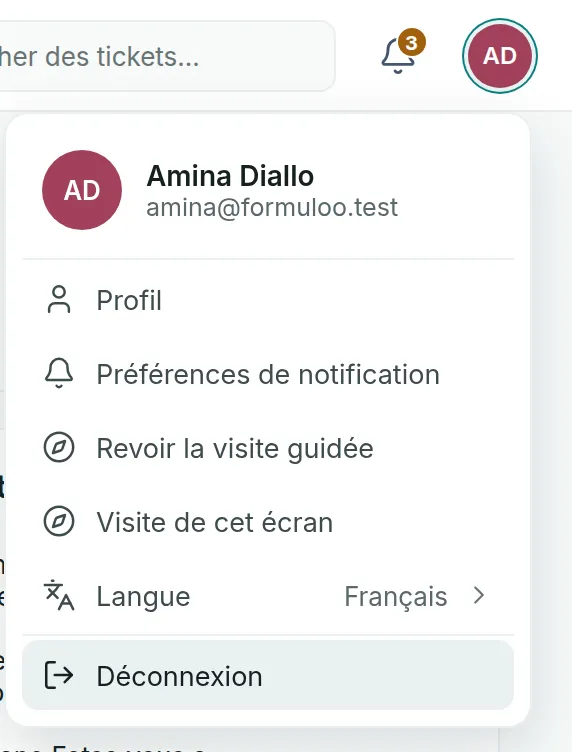
The Connexion (Sign in) page appears. It is in French for everyone, like the other sign-in pages and the account emails. Your sessions on your other devices stay open.
Close all your sessions
Link to the “Close all your sessions” section- In the bar, click your avatar, on the right.
- Click Profile.
- In the Password block, click Change password.
- Follow the link in the email and save a new password. The details are in Change your password.
All your sessions close, on all your devices. Sign in again with the new password.
If you get stuck
Link to the “If you get stuck” section| What you see | What to do |
|---|---|
| You left a session open on a shared computer. | In Open sessions, click Close next to that session. |
| You think someone else is using your account. | Click Close other sessions, then change your password. If you can no longer sign in, use Mot de passe oublié ? (Forgot password?) on the Connexion page. Then tell your administrator. |
| “Your session has expired. Please sign in again.” | The session has reached its maximum length, or it was closed from another device or by a password change. Sign in again. |
| “The request did not go through. Try again in a moment.” | The list could not be read, or the session could not be closed. Try again a little later. |
Good to know
Link to the “Good to know” section- A session lasts 10 hours at most. It closes sooner when GP-Formuloo stays closed for 30 minutes.
- After the sessions are closed, a screen already open on another device can keep working for up to 5 minutes, until its access expires.
- Choosing a new password through Mot de passe oublié ? also closes all your sessions.
- When a Super Admin deactivates an account, all the sessions of that account close.
Loading search…