Reference
Events that trigger a notification
Seven events give you a notification in the app, and sometimes an email. Here is who receives them, what they say, and what you are never notified about.
The seven events
Link to the “The seven events” sectionThe table uses the labels of the Notification preferences screen. Each event creates a notification in the app. The last column says whether an email goes out too, as long as you have not changed your preferences.
| Event | Who is told | Email by default |
|---|---|---|
| A ticket is assigned to me | The assignee, when a ticket is created with them as assignee or when a ticket’s assignee changes. | Yes |
| I am mentioned (@) | Each member cited with @ in a comment or in a ticket’s description, including when a comment is edited to add the mention. | Yes |
| New comment on my tickets | The reporter and the assignee of the ticket commented on. Someone the comment mentions receives the mention instead. | No |
| Status change on my tickets | The reporter and the assignee of the ticket moved. | No |
| Added to a project | The person an Admin adds to the project, and the Admins of that project. When someone accepts an invitation, only the Admins are told. | No |
| A sprint is closed | Every member of the project. | No |
| Invitation to join a project | The person invited, if they already have an active account. | Yes |
What the notifications say
Link to the “What the notifications say” sectionIn the bell and in the notification centre, each notification is one sentence that names the person who acted and, where relevant, the ticket key. Emails have their own subject, and are only sent in French. For example:
| Event | Sentence in the app | Email subject |
|---|---|---|
| A ticket is assigned to me | “Diane Fotso assigned you FORM-42” | “FORM-42 vous a été assigné” (FORM-42 has been assigned to you) |
| I am mentioned (@) | “Amina Diallo mentioned you on FORM-42” | “Vous avez été mentionné dans FORM-42” (You were mentioned in FORM-42) |
| New comment on my tickets | “Serge Kana commented on FORM-42” | “Nouveau commentaire sur FORM-42” (New comment on FORM-42) |
| Status change on my tickets | “Amina Diallo moved FORM-42” | “FORM-42 a changé de statut” (FORM-42 has changed status) |
| Added to a project | “Amina Diallo added you to a project” | “Vous avez été ajouté à un projet” (You have been added to a project) |
| A sprint is closed | “Amina Diallo closed a sprint” | “Un sprint vient d’être clôturé” (A sprint has just been closed) |
| Invitation to join a project | “Serge Kana invited you to join a project” | “Vous êtes invité à rejoindre un projet” (You are invited to join a project) |
The Admins told about an addition receive the same sentence as the person added.
What never triggers a notification
Link to the “What never triggers a notification” section- Your own actions. You are never told about what you have just done, even on a ticket where you are the reporter or the assignee.
- A change to a ticket’s summary, description, priority, due date, labels or estimate. Only a mention added to the description tells the person cited.
- For a change of assignee, the previous assignee. Only the new one is told.
- Removing a ticket’s assignee.
- Creating, starting or editing a sprint. Only closing it sends a notification.
- An import from Jira, even when it creates assigned tickets.
Where to read your notifications
Link to the “Where to read your notifications” sectionThe bell, in the top bar, shows the number of unread notifications and updates by itself, without reloading the page. A click on the bell shows the last three. See all opens the notification centre.
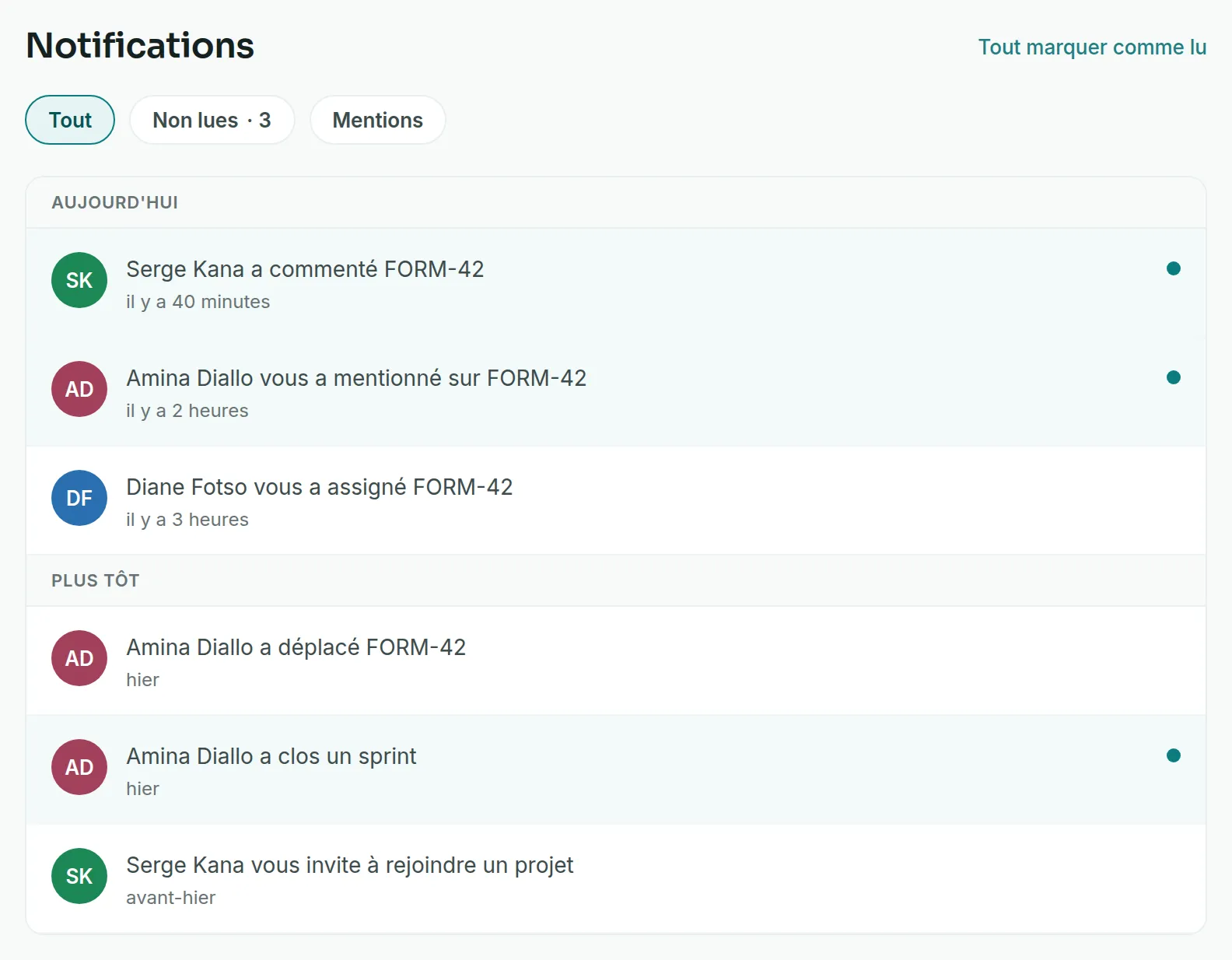
The centre sorts notifications under Today and Earlier. Three tabs filter them: All, Unread and Mentions. Clicking a notification marks it as read and opens the ticket concerned, or the invitation. A sprint closure or an addition to a project opens nothing, and the click only marks it as read. Mark all as read clears the unread ones in one go.
Good to know
Link to the “Good to know” section- The in-app notification cannot be turned off. Only the email can be set, event by event. See Turn off notification emails.
- Each notification sent by email makes one email on its own. Emails are not grouped.
- Each email ends with the link Gérer mes notifications (Manage my notifications), which opens your preferences.
- A read notification is deleted 90 days after it was read. An unread notification is kept.
- Account emails, such as the activation of an invited account or a password reset, are not notifications. They are always sent, in French too.